
Shield silentCAPTCHA Integration
If “Learn more about Shield silentCAPTCHA” brought you here, you’re in the right place. This article explains what it is, what it does, and why it exists, without going into technical detail you don’t need.
What Is Shield Security?
Shield Security is a highly advanced, all in one WordPress security solution designed for blocking bad bots, preventing security breaches, and keeping your site running smoothly. It combines intelligent detection, automated protection, and low friction security features so you get strong, always on defense without adding extra hassle for you or your visitors.
What Is silentCAPTCHA?
Shield silentCAPTCHA is our own, built‑in anti‑bot system technology inside the Shield Security plugin for WordPress. It is designed to protect WordPress site against automated spam and malicious submissions, while keeping your forms completely free of visible CAPTCHA challenges or puzzles.
For your visitors, nothing new appears on the page:
- no checkboxes
- no image grids
- no extra steps
All of the work happens silently in the background, while your forms continue to look and feel exactly as they do today.
What silentCAPTCHA Actually Does
When someone submits a form on WordPress site, Shield checks that request in real time using silentCAPTCHA.
Instead of asking the visitor to prove they are human, silentCAPTCHA looks at behaviour and technical signals that are typical for automated traffic. Each submission is evaluated. If it matches patterns that strongly suggest a bot or scripted tool, the request is blocked before it can complete. If it behaves like a normal human interaction, the submission is allowed through as usual.
From a visitor’s perspective, the form flow stays smooth. The only difference is that fewer automated submissions ever reach WordPres site.
How This Is Different From Standard CAPTCHA
Standard CAPTCHA systems try to protect WordPress site by interrupting visitors: they show a challenge, wait for a correct answer, and only then let the submission continue. That approach often introduces friction and side‑effects:
- slower form completion and drop‑offs
- lower conversion rates on key forms
- extra hurdles for users with accessibility needs
- frustration when challenges are hard to solve
- ongoing reliance on external CAPTCHA services
silentCAPTCHA takes the opposite route. It doesn't test people at all. It focuses solely on detecting automation. Shield evaluates the request at the security layer, not in the user interface, so your forms stay clean, simple, and consistent.
In practice, this means you get the benefit of an extra protection layer, without having to “put security on display” in front of every visitor.
How It Integrates With Your Forms
silentCAPTCHA connects directly into supported WordPress forms and login processes. Once it's enabled, Shield monitors submissions automatically, without extra fields, shortcodes, or separate API keys. We’ve also eliminated the usual page‑caching problems that can occur with traditional CAPTCHA solutions.
Typically, you will:
- enable silentCAPTCHA in Shield’s settings and/or
- turn on a Shield silentCAPTCHA option inside your form builder for a specific form.
After that, Shield silently checks submissions for the form types you’ve chosen, which can include:
- login and registration forms
- password reset and account‑related forms
- comment and contact forms
- checkout and other transactional forms (e.g. WooCommerce)
- custom user forms supported through integrations
We also work with plugin developers so that silentCAPTCHA can be built directly into their form systems, keeping everything as natural as possible inside the tools you already use.
Designed for Modern Bot Threats
Automated bots today are far more capable than older, simple scripts, and many use AI‑driven techniques to mimic human behaviour. They are often designed specifically to bypass traditional, challenge‑based CAPTCHA systems.
silentCAPTCHA is built with these modern threats in mind. Rather than relying on visible challenges, it evaluates how each request behaves and uses an internal scoring model ( "bot signals" ) to recognise automation patterns that basic CAPTCHA checks often miss.
The goal is to give you stronger, more flexible protection against bots, while keeping the experience for genuine visitors as straightforward as possible.
Privacy and GDPR
silentCAPTCHA is built to protect both WordPress site and visitors’ privacy. It runs entirely within WordPress site and doesn't rely on any external CAPTCHA services.
In practice, this means:
- No offsite requests are made to third‑party CAPTCHA providers.
- Data used for bot detection stays on own WordPress installation.
- Visitor information is not shared with external platforms as part of the CAPTCHA process.
By keeping processing local and avoiding external CAPTCHA calls, silentCAPTCHA is designed to work in line with modern privacy expectations and GDPR requirements, while still giving an effective protection against automated bots.
Why Site Admins Choose silentCAPTCHA
WordPress site admins turn on silentCAPTCHA because it offers protection that feels balanced:
- forms remain quick and easy to use for genuine visitors
- important conversion paths are not slowed down by extra steps
- pages stay visually clean, without prominent security widgets
- there are fewer support issues related to “CAPTCHA not working”
- dependence on external CAPTCHA providers is reduced
In short, it filters out automated submissions, while staying out of the way of real people.
How To Configure silentCAPTCHA In Shield
To configure silentCAPTCHA in Shield, you may go to Shield Security > Configure > Bots and IPs. When you click Configure next to the silentCAPTCHA component, you'll see all options for the silentCAPTCHA AntiBot technology, namely
You can configure these options in the way that best fits your site and your traffic.
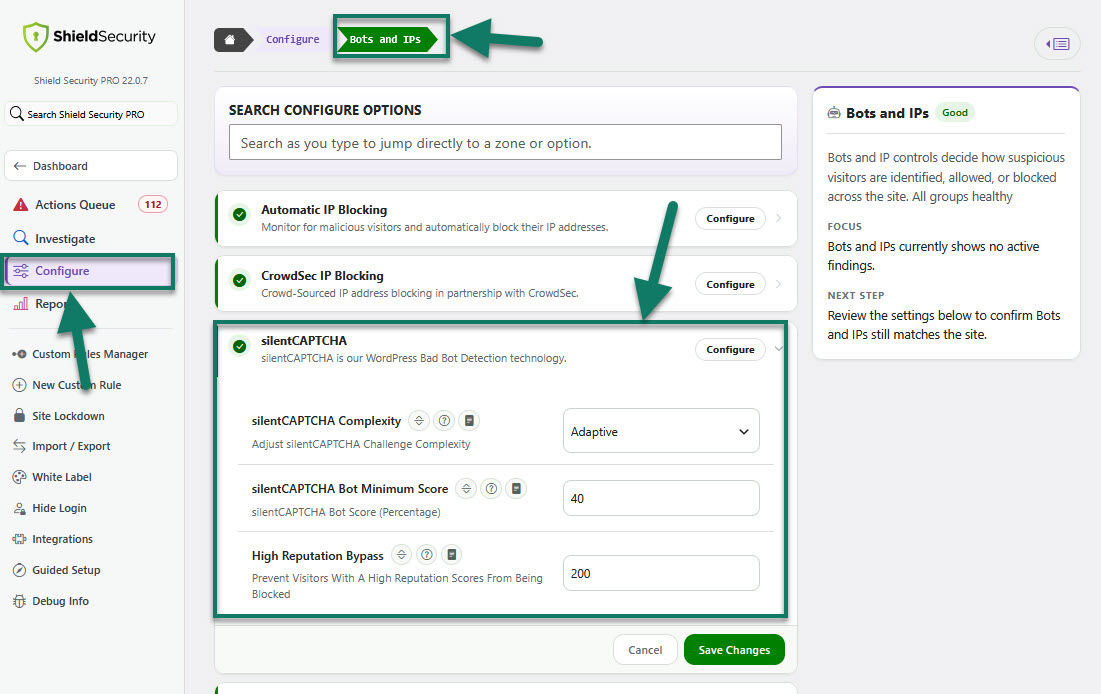
All silentCAPTCHA options are described in detail in these articles here.
For a more detailed, step-by-step guide to configuring silentCAPTCHA on your contact form, please see this article here.
What It Means When You Configure silentCAPTCHA
When you configure silentCAPTCHA options in your form builder and Shield Integrations settings, you are telling Shield to apply its invisible anti‑bot checks to that form type.
You don't need to redesign the form.
Your users and their site visitors don't need to learn anything new.
Nothing extra is added to the visible page.
Shield simply starts watching those submissions more closely in the background and works to keep automated spam and bot traffic away from your forms.
That is the purpose of Shield silentCAPTCHA.