
What Is The Custom Rules Builder And How To Use it?
The best way to see what the Custom Rules Builder is and how to use it, is to watch the below video.
Please note: The video in this article was recorded using an older version of ShieldPRO. The steps and features shown are accurate, but the interface may look slightly different from the current version. All screenshots and written instructions reflect the latest UI.
The Custom Rules Builder Summary
Shield's Custom Rules Builder can be accessed from within the Shield's main sidebar menu > Configure.
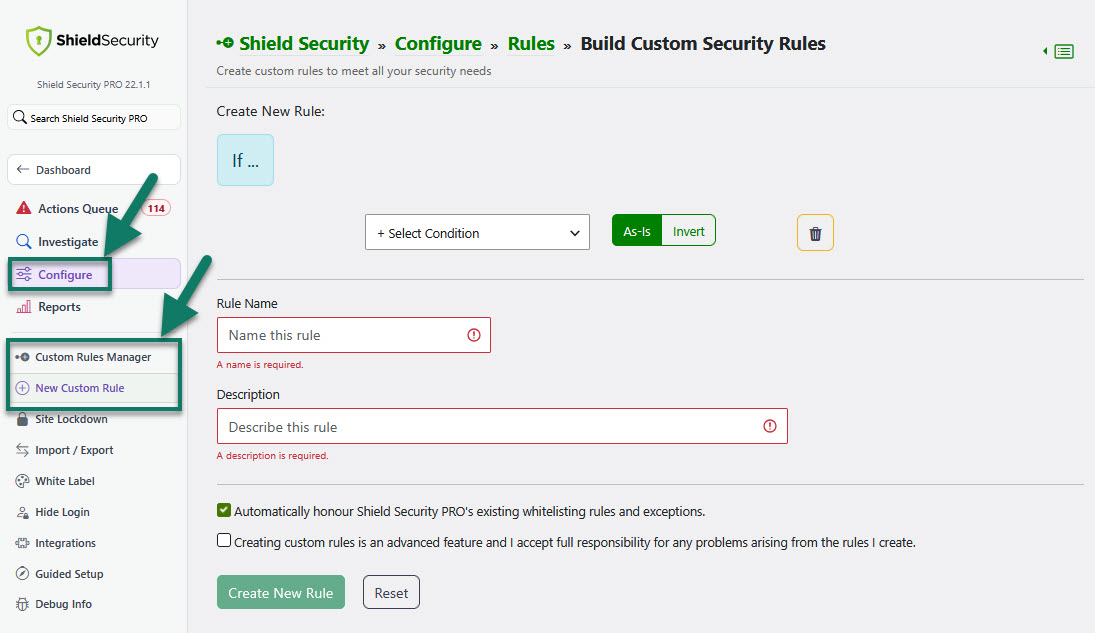
You can take control of your site's security by crafting rules that precisely align with your unique needs and preferences, and manage your custom rules.
How to use Custom Rules Builder
Shield's Custom Rules Builder offers a dynamic and flexible approach to security by replacing an extensive set of configuration options with a concise set of rules. Each rule consists of conditions and consequences, defining actions to be taken when specific conditions are met. This approach eliminates the need for constant configuration updates.
You can
- Build custom rules to meet all your security needs ("New Custom Rule" option)
- View, edit, disable, remove custom security rules ("Custom Rules Manager" option)
We also recommend you to read:
- A collection of examples for building your own custom security rules (+Videos)
- WordPress Security DIY With Shield’s Custom Rules Builder
- A Complete Guide To The Shield's Custom Rules Builder
Note: ShieldPRO is required for this feature. To find out what the extra ShieldPRO features are and how to purchase, please follow this link here.