
What are the Brute Force Protection feature options?
A brute-force attack is an attempt by the attacker to discover a password by trying a combination of letters, numbers, and symbols until he discovers the one correct combination that works. If successful, a brute force login attack enables the attacker to hack your account, log in to your site and steal information.
If your site does not require any login protection, you are a good target for a brute-force attack.
Shield's Brute Force Login Protection feature is designed to block brute force hacking attacks against your login and registration pages.
These options are located under the Shield main sidebar > Configure > Login > Limit Attempts: Login, Register & Lost Password Forms.
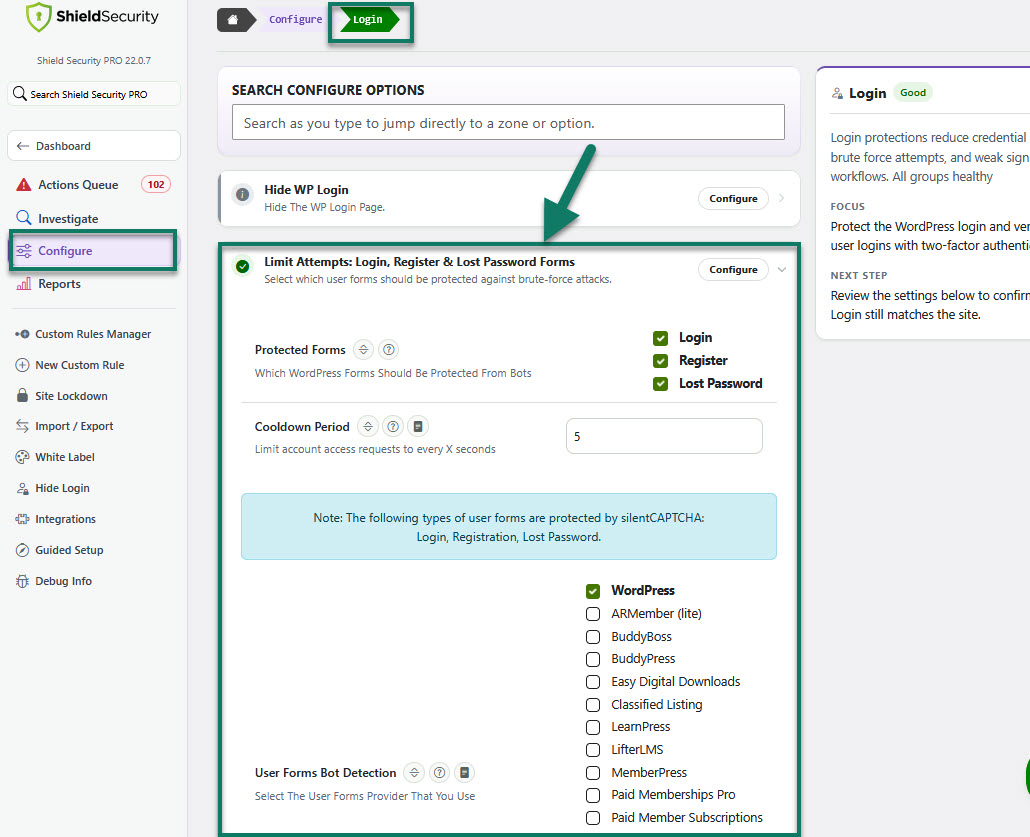
Brute Force Protection options explanations
The options available are as follows:
- Block Bots (running automatically in the background)
Use Shield's built-in silentCAPTCHA system to identify malicious bots and block all requests to your WordPress login.
silentCAPTCHA is ShieldPRO's exclusive bot-detection technology that removes the needs for CAPTCHA and other challenges.
You can choose the forms for which bot protection measures will be deployed
- login form
- registration form
- lost password form
- Login Cooldown Period
Limits login attempts to every X seconds. WordPress will process only 1 account access attempt per number of seconds specified.
-
User Forms Bot Detection (3rd-party support)
This option helps you to add support for 3rd-party login, register, password reset and checkout forms such as Woocommerce, BuddyPress and Easy Digital Downloads. The 3rd-Party Support feature is enabled by default on Pro sites.
To learn more about Brute Force Login Protection, read our blog article here.
We also recommend you to read: