
How to protect against comments SPAM by registered users
WordPress has this option available to help manage WordPress comments:

This works on the following simple principle:
- A person has previously posted one comment and it was approved by an admin.
- The approval whitelists this visitor as being trusted to post comments in the future.
- All future comments from this visitor/user will be automatically approved.
This presents a problem because there’s nothing to say that because a person posts 1 comment that wasn’t considered spam, their future comments will be acceptable.
In-fact, 1 strategy that spammers can take is to post a harmless comment, have it approved, and then come back later and post more spammy comments knowing that they’ll be accepted automatically.
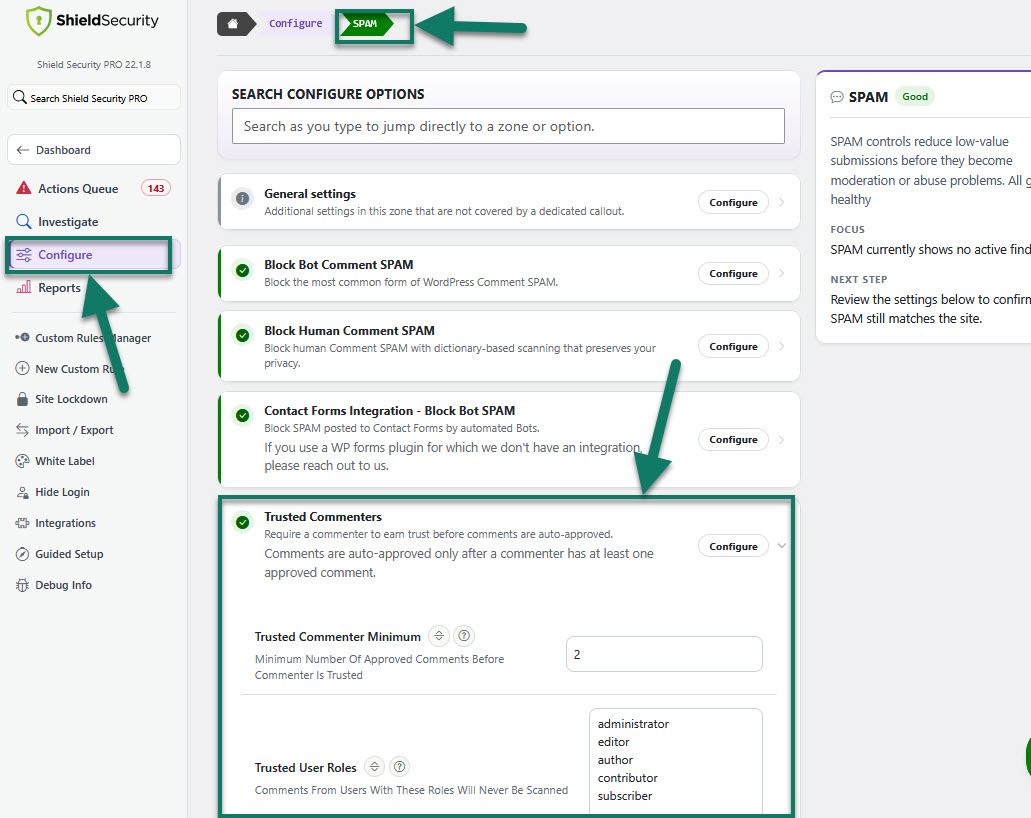
This issue can be mitigated by Shield's SPAM Protection feature, option 'Trusted Commenter Minimum' by increasing the minimum number of valid comments from one to ‘as many as you like‘. Even increasing this to two will go a long way to reducing spam and helping you identify spammers that employ the tactics above.
How to protect against comments SPAM by registered users
To do this, you can configure 'Trusted User Roles' to automatically trust certain user roles, and not others. In this way, “subscribers” on your site will also have their comments vetted in exactly the same way as non-registered visitors.
Just go to the main Shield sidebar menu > Configure > SPAM > Block Bot Comment SPAM > Trusted Commenters. Then, set the the minimum number of approved comments before commenter is trusted and list the trusted user roles.
We also recommend you to read: