
What is the Cookie-free silentCAPTCHA option?
The Cookie-free silentCAPTCHA option runs silentCAPTCHA without setting its visitor cookie.
Most sites should leave this option off. It's meant for sites where the silentCAPTCHA cookie causes problems, for example with page caching.
How cookie-free mode works
By default, silentCAPTCHA sets a short-lived cookie in the visitor's browser. This cookie tells the browser when to check in with your site again.
With Cookie-free silentCAPTCHA turned on, silentCAPTCHA sets no cookie. The browser keeps its check-in times in local storage instead. It then checks in on a timer.
In both modes, bot detection happens on your server.
Trade-offs to know about
Cookie-free mode comes with two trade-offs. Both are worth knowing before you turn it on.
More frequent check-ins
In cookie-free mode, visible pages check in more often than in cookie mode:
- WordPress login page: Every 1 minute
- Pages with any form: Every 2 minutes
- All other pages: Every 5 minutes
On busy sites, this adds background requests.
If a browser blocks local storage, it checks in on every page load.
Re-checks after an IP address change
After a visitor's IP address changes, their browser is re-checked.
This happens on the next page the visitor loads that your page cache didn't serve, at most once per refresh period.
Otherwise, the browser waits for its next timed check. A login or form sent in the meantime may be treated as coming from an unverified visitor.
When to turn this option on/off
Turn this option on only if the silentCAPTCHA cookie causes problems on your site, such as with page caching.
If silentCAPTCHA works well with its cookie, leave the option off.
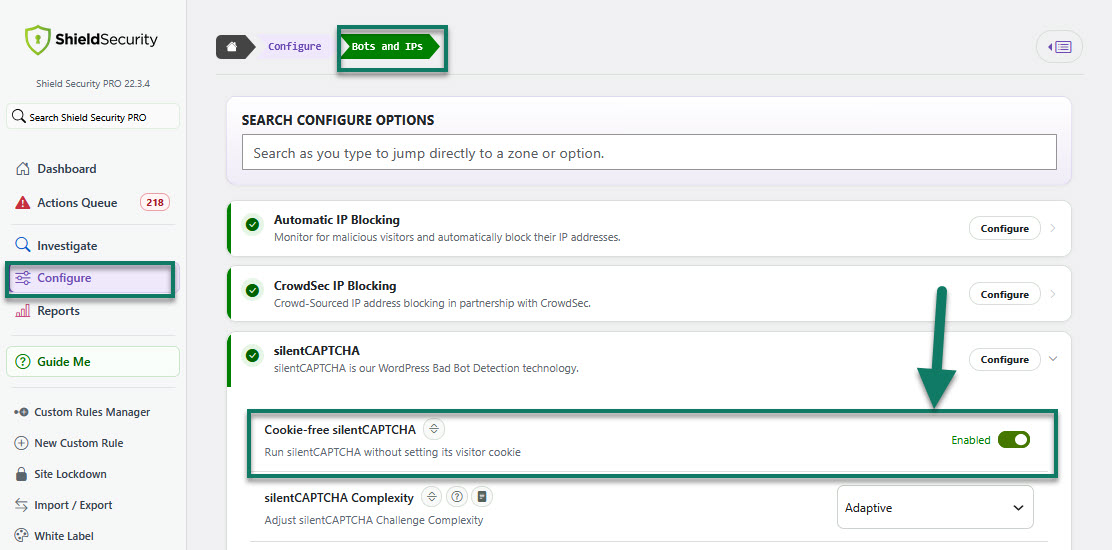
How to turn on Cookie-free silentCAPTCHA
- In Shield, go to Configure > Bots & IPs > silentCAPTCHA configuration
- Turn on Cookie-free silentCAPTCHA option
- Purge your page cache
To turn the option off, follow the same steps and turn it off. Purge your page cache after every change to this option.
What happens to existing cookies
silentCAPTCHA cookies already set in visitors' browsers expire on their own. Other cookies, such as WordPress login cookies, aren't affected.